Graphite planes define an operating boundary: Cerbi editorial artwork.

CerbiShield / Ongoing logging control

One logging policy.
A record of its operation.

After discovery, keep logging controls consistent across connected application teams. Manage versioned policy, targets, rollout, exceptions, and recorded outcomes in your Azure tenant. CerbiShield is the paid operating layer for this ongoing work.

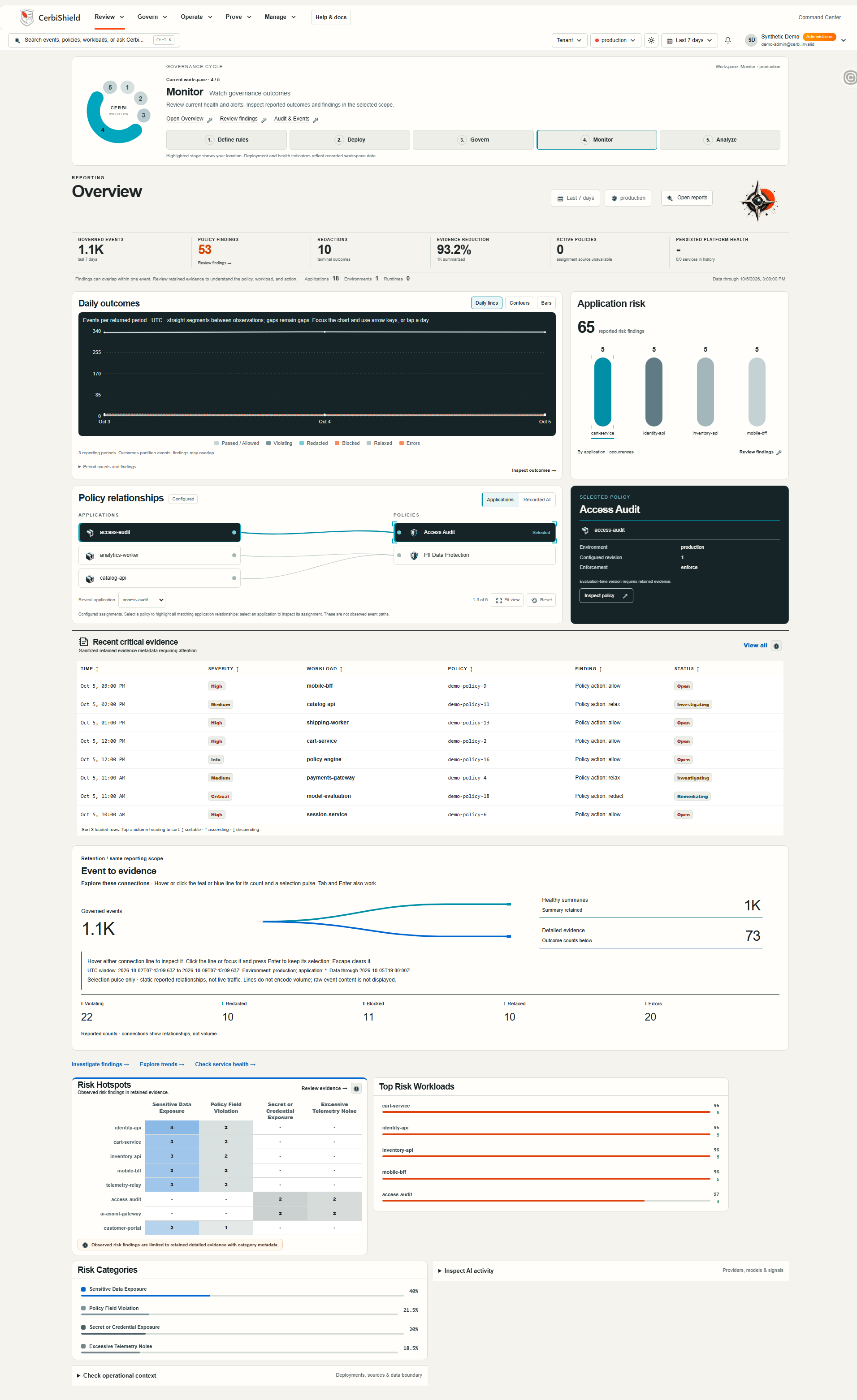
Command Center / Product viewOpen full resolution ↗
CerbiShield Command Center screenshot: Overview with outcomes and application risk. Policy findings, terminal outcomes, and retained evidence are shown with scope and source context.
Policy findings, terminal outcomes, and retained evidence are shown with scope and source context. Cropped to the most relevant section; open full resolution for the complete screen.

Inside CerbiShield / From observation to action

See what happened.
Know what to review.

A clear view of application risk, recorded policy outcomes and retained evidence. Built to help teams ask better questions of their logging controls.

01 / Command Center

Know where to look.

Bring recorded outcomes, application risk and policy relationships into one review. Give the next investigation a clear starting point.
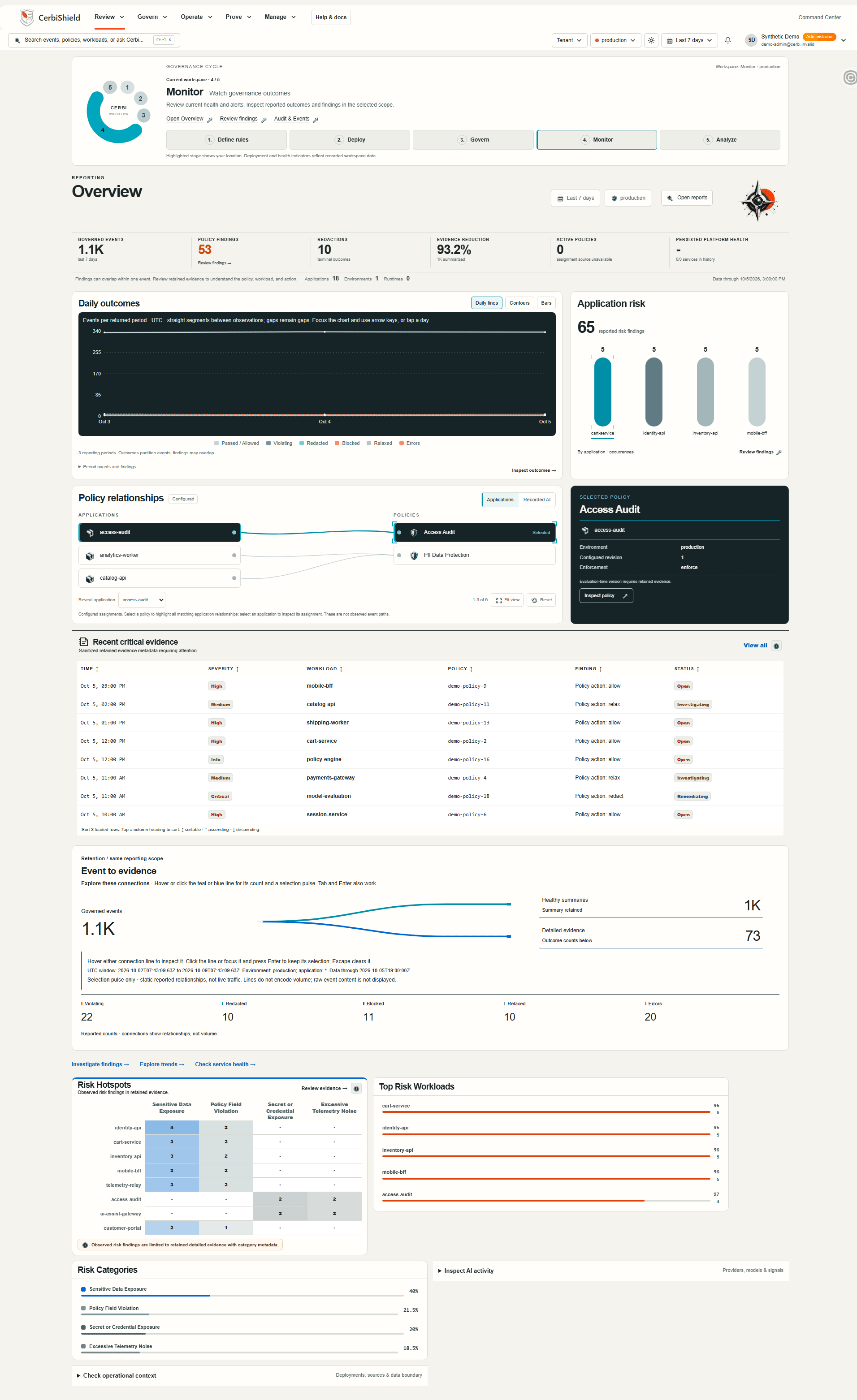
Actual CerbiShield Command Center UI with synthetic demo data. Review the selected scope and reporting window, then follow a finding into its application context.
Actual product UI · Illustrative demo data, not customer results. Scroll to inspect the complete capture.
What needs our attention?

Review the selected scope and reporting window, then follow a finding into its application context.

Explore the Command Center

02 / Violations Explorer

Find the field. Focus the fix.

Move from severity patterns to the application, rule and field behind a finding. Give engineering teams specific evidence to investigate.

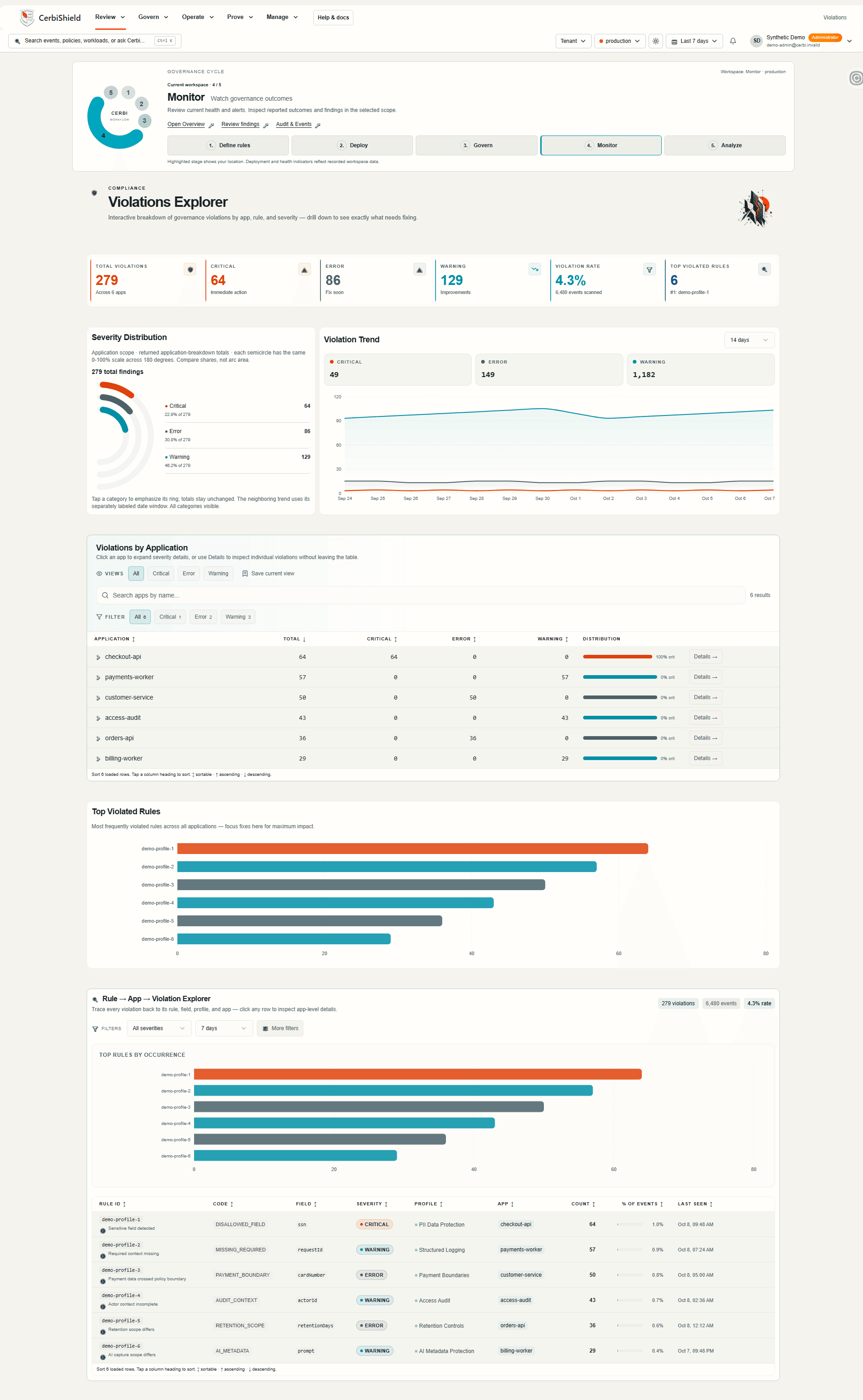
Violations ExplorerOpen full resolution
Actual CerbiShield Violations Explorer UI with synthetic demo data. Severity, application breakdowns and rule context help narrow the review. Counts retain their own labeled scope and time window.
Actual product UI · Illustrative demo data, not customer results. Scroll to inspect the complete capture.
Where should we investigate first?

Severity, application breakdowns and rule context help narrow the review. Counts retain their own labeled scope and time window.

Inspect application risk

03 / Reporting

See the pattern behind the outcome.

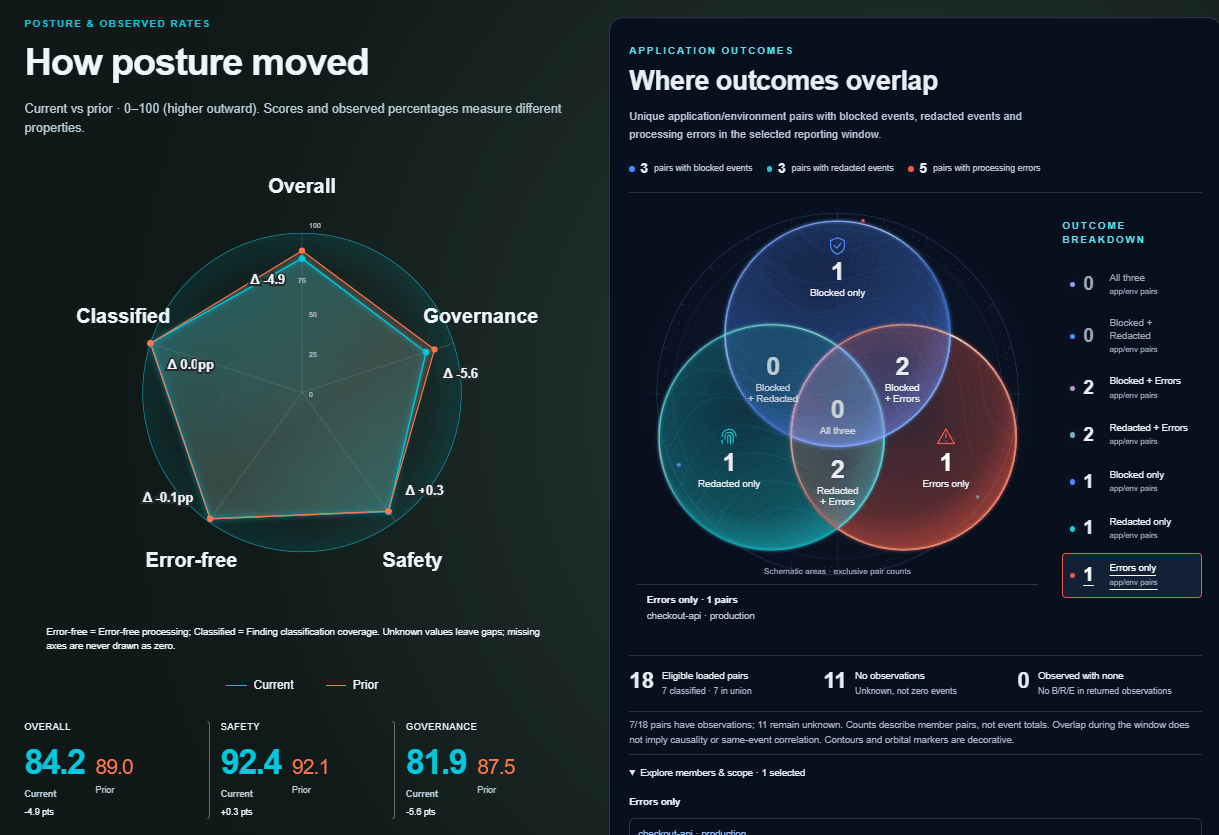
Compare current and prior posture, then explore where blocked, redacted and error outcomes overlap. Turn a broad governance question into a focused review.

Actual CerbiShield Reporting UI with synthetic demo data. Overlap counts application/environment pairs, not event totals. Unknown observations remain unknown; the chart does not imply causality.
Actual product UI · Illustrative demo data, not customer results.
What changed, and where do outcomes overlap?

Overlap counts application/environment pairs, not event totals. Unknown observations remain unknown; the chart does not imply causality.

Explore posture and outcomes

04 / Evidence Center

Keep the detail that explains it.

Connect governance summaries with retained evidence. Review what is available, its scope, and the source limitations that matter to the decision.

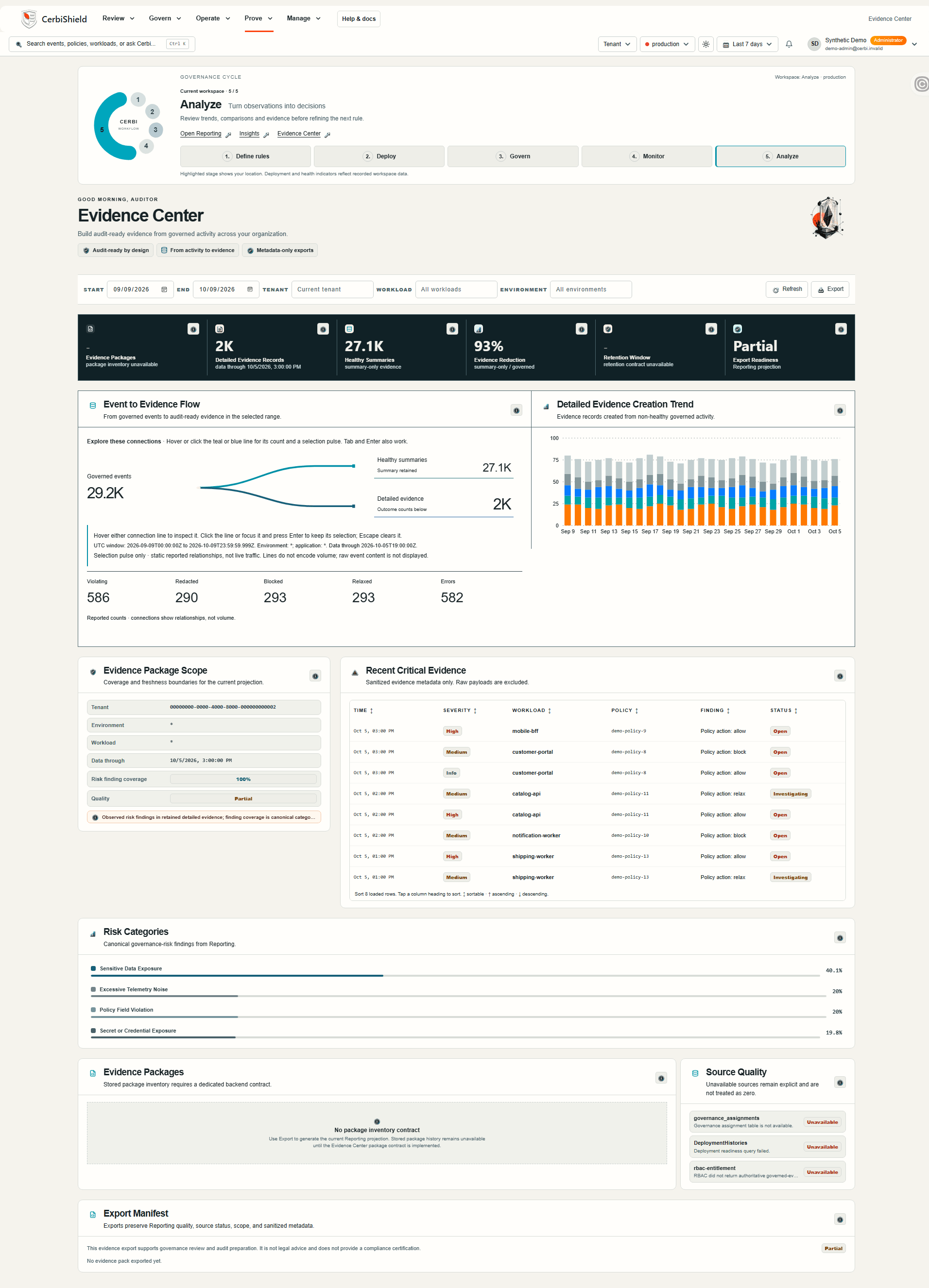
Actual CerbiShield Evidence Center UI with synthetic demo data. This demo shows a partial Reporting projection. Package inventory and retention sources are unavailable; those states remain visible in the capture.
Actual product UI · Illustrative demo data, not customer results. Scroll to inspect the complete capture.
What can we actually review?

This demo shows a partial Reporting projection. Package inventory and retention sources are unavailable; those states remain visible in the capture.

Follow retained evidence

Discover → Define policy → Enforce → Prove

Policies

Turn reviewed logging risks into versioned governance profiles and validate representative fields.

Deployments

Apply policy at selected application or OTLP log boundaries and review rollout state.

Investigation

Review findings, terminal outcomes, and traceable relax decisions where supported.

Reporting + audit

Review policy, application, and time-window context where recorded, plus configuration history.

Governed Applications

Workload access.
Under control.

Use existing Microsoft Entra workload principals with stable tenant-scoped application identities, viewer/editor assignments, token validation, and active installation entitlement.

Revoke an assignment or disable an application. Authorization fails closed and changes remain auditable.

Explore Governed Applications
  1. 01

    Register

    Create a stable, tenant-scoped governed application.

  2. 02

    Authorize

    Associate existing Entra workload principals; assign viewer or editor access.

  3. 03

    Govern

    Validate the workload token and active installation entitlement for governed access.

  4. 04

    Observe

    Read back governance profiles and review the recorded lifecycle.

  5. 05

    Revoke

    Revoke an assignment or disable the application; authorization fails closed.

  6. 06

    Audit

    Retain the authorization lifecycle, including changes and denials.

AI logging / Pro++ option

AI-related logs. The same
logging controls.

Review supported provider, model, agent, and tool metadata on connected logging paths. Inspect classifications, token metadata, estimated cost, and policy evidence where supplied. This does not authorize agent actions or control model behavior.

Metadata first. Raw prompts and responses are not collected by default. Separate from the Cerbi AI assistant.

Explore scope and capabilities
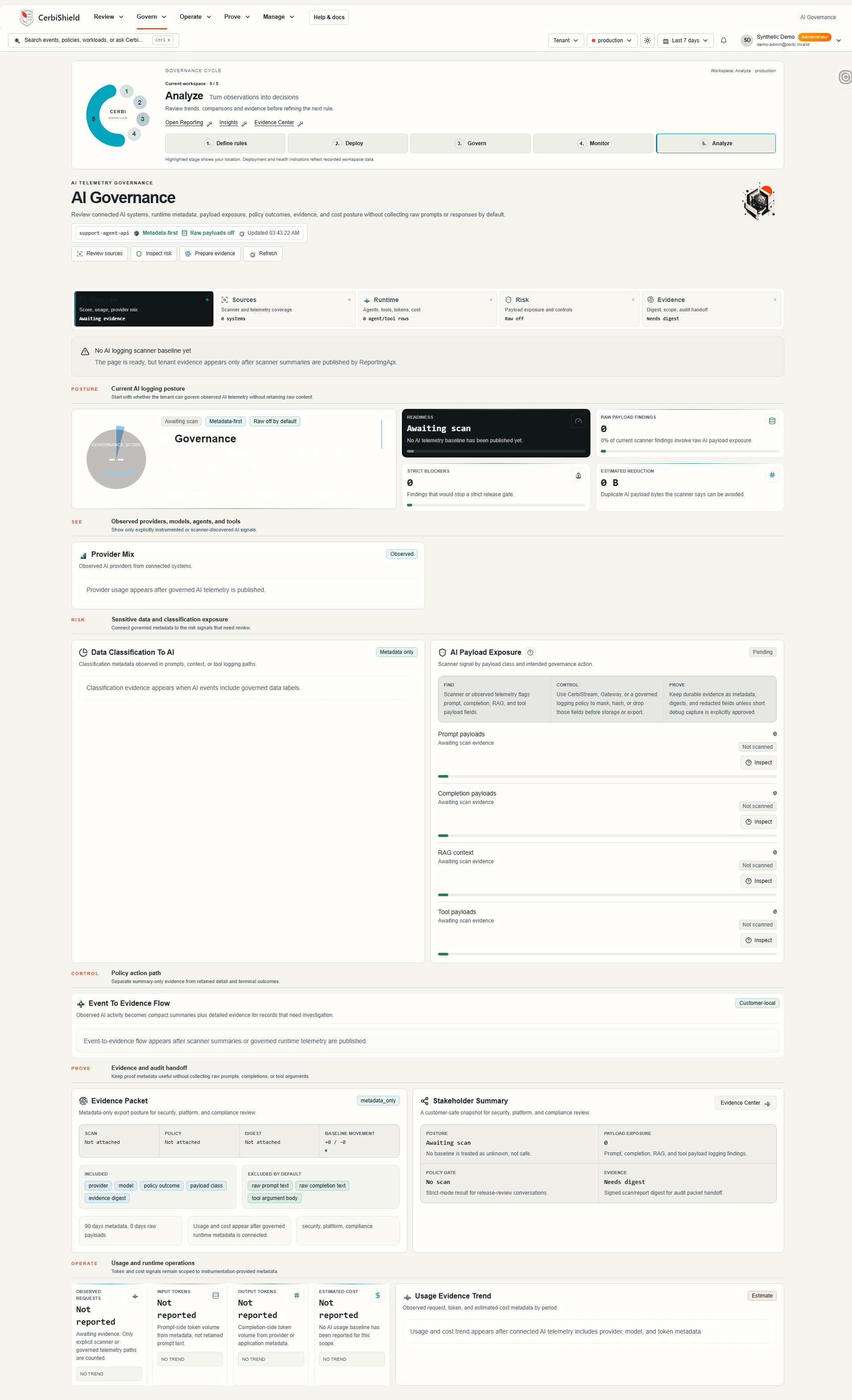
AI Logging Governance / Illustrative previewOpen full resolution ↗

Illustrative AI preview. Example values are not tenant observations; this preview does not collect tenant AI telemetry.

CerbiShield AI Logging Governance screenshot: AI logging posture and readiness. Provider, model, agent, and tool context where logged; policy and usage evidence where supplied. This is not agent-action authorization.
Provider, model, agent, and tool context where logged; policy and usage evidence where supplied. This is not agent-action authorization. Cropped to the most relevant section; open full resolution for the complete screen.

Deploy with
architectural control.

Available through Microsoft Marketplace. CerbiShield deploys as an Azure Managed Application into the customer tenant, with managed identities and server-side tenant isolation.

Technical architecture

Keep the stack you already have.

Use application-local governance or an explicitly configured Gateway for selected OTLP log paths. Keep downstream observability, SIEM, and APM tools in place. Your team owns Azure operation, integrations, access, policy configuration, and review of coverage and failures. A path you have not connected is not governed.

A founder-led logging-risk review

Find the control gap.
Test one workload.

Bring a Scanner finding, a sensitive-field concern, or an evidence requirement. Compare existing controls first. If a gap remains, agree one workload, one policy, an evaluation window, and evidence to review before deciding on a recurring CerbiShield deployment.

CerbiShield | Cerbi